Start clipping free
AI-powered podcast clipping

Find your podcast's
best moments

Stop scrubbing hours of audio. PodClip maps your conversation, identifies speakers, and surfaces the insights, confessions, and punchlines worth sharing. Save 3–5 hours per episode.

Conversation Flow Ep. 47 · 58:32
00:00 Sarah (Host)

Welcome & topic intro

04:15 Dr. James Liu (Guest)

Background on framework research

12:34 Dr. James Liu CLIP

"Everyone keeps building on assumptions that were wrong from day one..."

97% viral score 0:42 clip
18:20 Sarah (Host)

Follow-up on methodology

24:18 Dr. James Liu CLIP

"I was staring at the screen at 3AM and suddenly it clicked..."

92% viral score 0:38 clip
0+
Episodes clipped
0+
Clips generated
0 hrs
Saved per episode (avg)

Your best moments are buried

You recorded a great episode. Somewhere in that 90-minute conversation is a 40-second moment that could reach millions. But finding it means scrubbing through the entire recording, listening for energy shifts you might miss. Most podcasters spend 3–5 hours per episode on clip selection alone.

3–5 hrs

Manual clip selection per episode

72%

Of viral moments happen in quiet insights, not loud peaks

0:42

Average length of a clip that actually gets shared

From upload to clips in minutes

Three steps. No editing skills required.

Step 1

Upload your episode

Drop in an audio or video file, paste an RSS feed, or connect your podcast host. We handle the rest.

Step 2

AI maps your conversation

PodClip transcribes, identifies speakers, tracks topic flow, and scores every moment for viral potential.

Step 3

Your clips are ready

Review ranked clips with transcripts, edit boundaries, and export in any format. Share directly to social.

Podcast recording studio with warm amber lighting

Not just volume spikes.
Conversation intelligence.

Generic clippers look for loud moments. PodClip understands the conversation. It tracks who's speaking, when topics shift, and where the emotional resonance actually happens. The quiet confession after a long setup. The unexpected pivot. The punchline that lands because of everything before it.

Speaker-aware editing

Never cuts mid-sentence or splits a question from its answer

Topic mapping

Visual conversation flow shows exactly when subjects change

Viral scoring

Every moment scored based on emotional resonance, surprise factor, and shareability
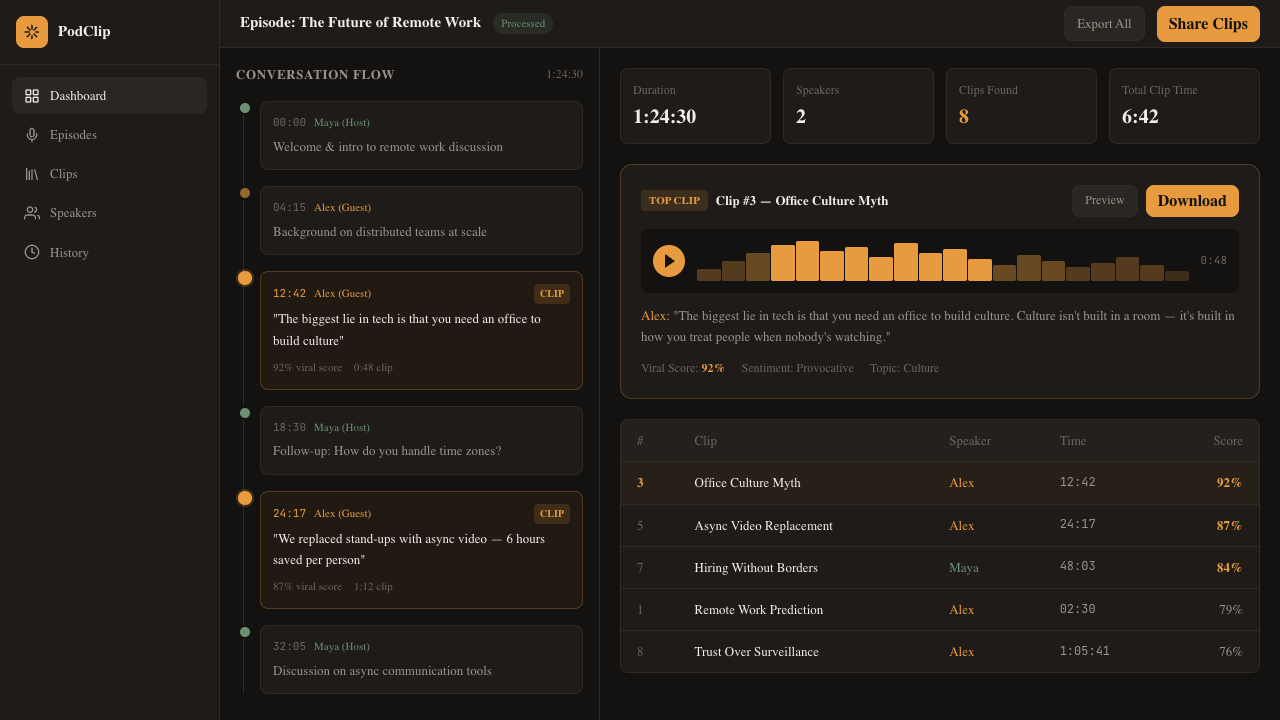
See every moment at a glance

Your full episode, mapped and ready for clipping.

app.podclip.ai/episodes/47
PodClip dashboard showing conversation timeline with detected clips

Built for podcasters who ship

Everything you need to turn episodes into a content engine.

Multi-speaker detection

Automatically identifies and labels each speaker. Color-coded timeline shows who's talking when.

Smart clip boundaries

AI preserves context. Question-answer pairs stay together. No awkward cuts mid-thought.

Multi-format export

Export as vertical reels, square posts, or widescreen. Auto-captioned and ready for every platform.

Viral scoring

Every clip gets a shareability score based on emotional resonance, surprise factor, and pacing.

Full transcripts

Searchable, speaker-labeled transcripts with timestamps. Find any moment by searching what was said.

RSS auto-import

Connect your feed and clips generate automatically when new episodes drop. Set it and forget it.

Simple, honest pricing

Start free. Upgrade when your show grows.

Free

For trying PodClip out

$0 / month
  • 3 episodes per month
  • Up to 5 clips per episode
  • Speaker detection
  • Standard export (720p)
Get started free

Questions & answers

What audio formats does PodClip support?

MP3, WAV, M4A, FLAC, and MP4 video files. You can also paste an RSS feed URL and we'll pull episodes directly. Maximum file size is 500MB on Free, unlimited on Pro.

How accurate is the speaker detection?

Our speaker diarization achieves 95%+ accuracy on typical 2-3 person conversations. For episodes with more speakers or significant crosstalk, you can manually correct labels in the editor and the model learns from your corrections.

Can I edit the clips before exporting?

Yes. Every detected clip has adjustable start and end points. You can extend, trim, or combine clips. The transcript view makes it easy to set precise boundaries by clicking on words.

What makes the viral scoring work?

We analyze emotional arc, surprise factor, statement clarity, and pacing. The model was trained on thousands of clips that actually went viral on social platforms. It looks for the structure of shareable moments, not just volume spikes.

Can I cancel anytime?

Yes. Cancel from your dashboard in one click. No contracts, no cancellation fees. Your clips and transcripts remain accessible for 30 days after cancellation.

Your next viral clip is already recorded

Stop leaving your best moments on the cutting room floor. Start clipping in minutes, not hours.

Free plan available. No credit card required.